
What Objects Really Are: Storage, Value, and Type Unveiled
Understand the trinity that makes C++ tick and why your “object” isn’t what you think.

Introduction
Remember that crash where you swore the object was alive, but the debugger said otherwise? We all have been there, spent an entire day tracking down a dangling reference that turned out to be a misunderstanding of when lifetimes actually start. The culprit? I thought declaring a variable meant the object existed. Nope. C++ has a more nuanced view, and understanding it is the difference between writing code that works and code that merely compiles.
This is Part 1 of an 8-part series on C++ object lifetimes. We’re building from the ground up: what objects are, how they live and die, and how to wrangle them without invoking undefined behavior. By the end, you’ll spot lifetime issues before they bite, write safer code, and maybe even impress your code reviewer. Let’s start with fundamentals: storage, value, and type.
The Trinity: Storage, Value, Type
In C++ standard, an “object” isn’t just class instancesit’s any region of memory with a type and value. An int, a pointer, even a char array: all objects. Functions? Not objects. References? Not objects (they’re aliases). But that int i = 42;you just declared? That’s an object, and it has three properties:
Storage: Where it lives. In C++, memory is a sequence of contiguous bytes, each with a unique address. Your object occupies one or more of these bytes. Think of storage as the physical real estate.
Value: What the bits mean. A byte storing
0x42could be the integer 66, the character ‘B’, or part of a 32-bit float. The interpretation depends on...Type: The decoder ring. A type like
intorfloattells the compiler how to interpret the byte pattern. It’s a mapping: bits → meaning.
Here’s a concrete example:
#include <iostream>

int main() {
    // Storage: 4 bytes at some address
    // Type: int (signed 32-bit on most platforms)
    // Value: 42
    int x = 42;

    std::cout << "Address: " << &x << "\n";
    std::cout << "Value: " << x << "\n";
    std::cout << "Size: " << sizeof(x) << " bytes\n";

    return 0;
}
Compile and run:
g++ -std=c++17 -Wall -Wextra -O0 storage_value_type.cpp -o svt_exec && ./svt_execFlags explained: -std=c++17 for modern features, -Wall -Wextra to catch warnings, -O0 to disable optimizations (we want raw behavior, not compiler cleverness).
Output (example):
Address: 0x7ffc8e2f4a3c
Value: 42
Size: 4 bytes
Platform Note: Output may differ on Windows (use cl.exe) or macOS (clang++); addresses are arbitrary. Tested on Linux Mint 22, GCC 13, x86-64.
Let’s peek at the assembly to see the value stored:
g++ -std=c++17 -S -O0 storage_value_type.cpp -o svt.sRelevant snippet (trimmed):
movl $42, -4(%rbp) # Store 42 at stack offsetSee that movl? It’s loading the immediate value 42 into memory. The storage is at rbp - 4 (stack), the type is implicit (movl = 32-bit), and the value is 42. Three properties, one line.
What Isn’t an Object
Two common gotchas:
Functions: They have storage (code in memory), but C++ doesn’t call them objects. However, function pointers are objects as they store an address value. Functions implicitly convert to pointers when needed.
References: They’re aliases, not separate objects. If you declare
int& r = x;,randxrefer to the same object. Every property ofx-type, value, address is shared. References don’t occupy distinct storage (though compilers may use hidden pointers under the hood).
Lifetime: The Fourth Dimension
An object’s lifetime is its runtime property: the span from when it becomes usable to when it’s destroyed. All other properties (type, value, storage) only matter during the lifetime. Before lifetime starts or after it ends, accessing the object is undefined behavior, except in very limited ways we’ll cover in Part 8.
The lifecycle looks like this:
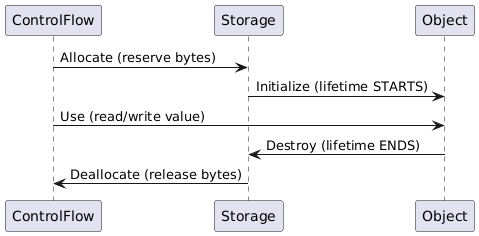
Key insight: Allocation ≠ lifetime start. You can have storage ready but no object living in it yet. And destruction ≠ deallocation, storage might stick around (e.g., reused for another object).
Example with a non-trivial type:
#include <iostream>
#include <string>

struct Chatty {
    std::string name;
    Chatty(const char* n) : name(n) { std::cout << "Born: " << name << "\n"; }
    ~Chatty() { std::cout << "Died: " << name << "\n"; }
};

int main() {
    std::cout << "Before block\n";
    {
        Chatty obj("Bob");
        std::cout << "Inside block\n";
    } // obj destroyed here, lifetime ends
    std::cout << "After block\n";
    return 0;
}
Run it:
g++ -std=c++17 -Wall -Wextra -O0 lifetime_demo.cpp -o lt_exec && ./lt_execOutput:
Before block
Born: Bob
Inside block
Died: Bob
After block
Lifetime: from after the constructor completes to when the destructor starts. Between “Born” and “Died,” obj is alive. Outside that window? Accessing it is UB.
Terminology Trap: “Created” ≠ Lifetime Starts
The standard says objects can be “created,” but this is subtle. “Created” means we can talk about the object as it has a name, a type, maybe storage allocated. But its lifetime might not have started yet. For example, a global variable is “created” at program start, but a thread-local variable’s lifetime doesn’t start until the thread does.
Destruction, however, is concrete: calling a destructor does end the lifetime. It’s asymmetric. (I got bitten by this once in a custom allocator, assumed “created” meant “alive.” It didn’t.)
Try It Yourself
Modify the
Chattyexample: Add a second object in the same block. Does construction/destruction happen in reverse order? (Hint: It should LIFO.)Inspect storage: Use
reinterpret_cast<unsigned char*>(&x)to print individual bytes of anint. Observe endianness (x86-64 is little-endian, so 42 =0x2a 0x00 0x00 0x00).Break it gently: Try accessing
obj.nameafter the closing brace (inmain). Compile with-fsanitize=address(AddressSanitizer) to catch the use-after-scope bug:
g++ -std=c++17 -fsanitize=address lifetime_demo.cpp -o lt_asan && ./lt_asanPort to C++20: Use
std::cout << std::format("Value: {}\n", x);if your compiler supports<format>.
Conclusion
You now know the three pillars as storage, value, type and the lifetime that governs when they’re valid. Objects aren’t just class instances; they’re fundamental to every variable, every new call, every byte you touch. This mental model will save you from countless dangling-pointer bugs.
Next up: storage durations which is automatic, static, and thread-local. We’ll see when storage gets allocated and deallocated, which sets the stage for understanding when lifetimes can start. (Spoiler: not all storage durations are created equal, and some will trip you up if you’re not careful.)